

Terraform Infrastructure Security Audit Checklist - terraform infrastructure security checklist
Deploying cloud resources with automated code fundamentally shifts how engineering teams build software systems. However, fast automation creates massive attack surfaces when code moves ahead of security governance. If you want to systematically audit your cloud deployments and block silent vulnerabilities, establishing a reliable terraform infrastructure security checklist is your best defense. Security teams frequently uncover unencrypted state files, hardcoded passwords, and wide-open firewalls buried deep inside automated scripts. A structured audit process catches these mistakes before code ever touches production environments.
Table of Contents
- Securing Infrastructure as Code: The Modern Threat Landscape
- Phase 1: Securing Terraform State Files and Backend Storage
- Phase 2: Static Analysis, Secrets Management, and Policy-as-Code
- How to Implement a Terraform Infrastructure Security Checklist
- Phase 4: Integrating Official InDevXo Networking Security into IaC Architectures
- Phase 5: Enforcing Least Privilege in CI/CD Automation Pipelines
- Sustaining Zero-Trust Infrastructure Through Continuous Security
Modern cloud security challenges don't start after deployment. They start right in your code editor. Infrastructure as Code (IaC) lets developers spin up entire virtual networks in seconds. That speed is great. But single errors clone across dozens of regions instantly. When developers rely on permissive default configurations, open database ports and unrestricted internet gateways spread automatically.
State files pose another massive risk in IaC environments. Think of a Terraform state file as a detailed blueprint that keeps private keys written on the table in clear text. It holds exact resource mappings, private IP addresses, and plain secrets. Leaving backend storage buckets public or unencrypted gives attackers complete access to your environment. Hardcoded credentials inside configuration files create identical risks when pushed to public git repositories.
To prevent costly breaches, teams need continuous static scanning and strong policy enforcement. Static scanners like Checkov and tfsec help spot configuration flaws during early development stages. But software tools alone can't protect your virtual perimeters without clear architectural standards. Integrating authentic InDevXo Networking Security solutions guarantees your cloud templates enforce direct, verified traffic controls from day one. Pairing official network controls with a modern terraform infrastructure security checklist turns reactive fire-fighting into automated, repeatable safety across your whole deployment pipeline.
Phase 1: Securing Terraform State Files and Backend Storage

Your Terraform state file acts like a master blueprint for your entire cloud setup. It tracks every database, server, and network route. It also stores passwords, API tokens, and private keys in plain text. If an attacker gets read access to this file, your whole cloud breaks open. Securing this file sits at the very top of any practical terraform infrastructure security checklist. You can't skip it.
Leaving state files on local laptops or unsecured storage buckets invites disaster. A single compromised workstation exposes your entire cloud layout. We must isolate state storage inside hardened, encrypted backends with strict access controls.
Securing Backend Storage for Your Terraform Infrastructure Security Checklist
Every major cloud provider offers secure object storage for backend state files. The goal is simple: encrypt everything at rest, require TLS for data in transit, and block public access entirely. Below are working backend configurations for AWS, Azure, and Google Cloud Platform.
AWS S3 with DynamoDB State Locking:
terraform {
  backend "s3" {
    bucket         = "company-tfstate-prod-us-east-1"
    key            = "core-infra/terraform.tfstate"
    region         = "us-east-1"
    encrypt        = true
    kms_key_id     = "arn:aws:kms:us-east-1:123456789012:key/abc-123-def"
    dynamodb_table = "terraform-state-locks"
  }
}
Azure Blob Storage:
terraform {
  backend "azurerm" {
    resource_group_name  = "rg-terraform-backend"
    storage_account_name = "sttfstateprod001"
    container_name       = "tfstate"
    key                  = "production.terraform.tfstate"
    use_azuread_auth     = true
  }
}
Google Cloud Storage (GCS):
terraform {
  backend "gcs" {
    bucket      = "gcp-tfstate-prod-storage"
    prefix      = "terraform/state"
    kms_key_name = "projects/prod-project/locations/global/keyRings/tf-ring/cryptoKeys/tf-key"
  }
}
Comparing Cloud State Storage Protections
| Cloud Provider | Encryption at Rest Strategy | State Locking Mechanism | Access Logging Method |
|---|---|---|---|
| AWS (S3) | AWS KMS (Customer Managed Keys) | DynamoDB Table | S3 Server Access Logs / CloudTrail |
| Azure (Blob) | Customer-Managed Keys (Key Vault) | Native Blob Leases | Azure Monitor / Storage Logs |
| GCP (GCS) | Cloud KMS (CMEK) | Native GCS Object Locks | Cloud Audit Logs |
Preventing Race Conditions and Auditing Access
What happens when two engineers run terraform apply at the exact same minute? Without state locking, your state file corrupts. DynamoDB prevents this on AWS by creating a lock record during changes. Azure Blob and Google Cloud Storage use built-in object locking natively. Never bypass locking.
Access logging is your camera system. Enable write-once access logging on your state storage buckets. If an unauthorized entity attempts to pull your state file, your security operations center gets alerted immediately. Send these access logs to a separate log-archive account that standard developers can't touch.
Locking down network perimeters around backend storage endpoints keeps unauthorized IPs out completely. Pairing cloud IAM policies with our official InDevXo Networking Security solution ensures your CI/CD deployment runners communicate across verified, private network pathways.
Scrubbing Plain-Text Secrets and Understanding Output Limits
Many engineers fall into a dangerous trap with secret variables. They mark an output as sensitive and think the work is done.
Security Reality Check: Setting sensitive = true on an output variable only hides the text from showing up on your terminal screen. It does not encrypt the value inside your backend JSON state file.
If you pass a database password through input variables, Terraform writes that plain-text string directly into the state file. Anyone with read permission on your S3 bucket can open the JSON file and view your passwords.
Stop putting raw secret strings in your .tfvars files. Instead, use external secret managers like HashiCorp Vault, AWS Secrets Manager, or Azure Key Vault. Have your application resources pull secrets dynamically at runtime, or use dynamic provider references so sensitive material never lands inside your state file on disk.
Phase 2: Static Analysis, Secrets Management, and Policy-as-Code
Hardcoding secrets in code is a recipe for disaster. We've all seen API keys accidentally pushed to public repositories. Static code scanners and automated policy checks act like a high-speed spellchecker for your cloud infrastructure. They catch security blunders on your laptop long before any code reaches production environments.
Static Code Scanners for Your Terraform Infrastructure Security Checklist
Before you run a single deployment command, your code needs to pass a pre-commit audit. Static analysis tools read your code files without executing them. They compare your configurations against thousands of known security vulnerabilities and compliance frameworks.
Integrating tools like Checkov and tfsec directly into local Git pre-commit hooks prevents weak code from leaving a developer's workstation. If someone tries to commit an open security group or an unencrypted database, the commit fails instantly.
Field Pro-Tip: Treat policy violations like syntax errors. If a build breaks due to an unencrypted S3 bucket, don't bypass the check—fix the HCL code before merging.
Here is how popular open-source analysis tools compare when building your pre-commit pipeline:
| Tool Name | Primary Focus | Best Use Case | Policy Style |
|---|---|---|---|
| Checkov | Multi-framework IaC scanning | CI/CD pipelines and deep compliance checking | Python or YAML policies |
| tfsec / Trivy | Fast Terraform static analysis | Local pre-commit hooks and quick developer feedback | Built-in Go rules & Rego |
| OPA (Open Policy Agent) | General policy-as-code evaluation | Custom guardrails across JSON plan files | Rego language queries |
Applying these automated scanning gates transforms your team's workflow into a bulletproof terraform infrastructure security checklist phase. It forces security standards right to the beginning of your development cycle.
Eliminating Hardcoded Credentials with Dynamic Secrets
Storing plaintext cloud credentials or database passwords inside .tf files or plan outputs creates massive security risks. Plaintext values leak through state files, terminal outputs, and git history. Replacing static credentials with short-lived dynamic secrets solves this problem entirely.
Instead of hardcoding a database password, request temporary credentials at run-time using official engines like HashiCorp Vault secrets engine documentation or cloud-native Key Management Services (KMS). Think of dynamic secrets like a digital keycard for a hotel room. It grants temporary access to perform a specific task and expires automatically after ten minutes.
# Example: Retrieving dynamic short-lived credentials from HashiCorp Vault
data "vault_generic_secret" "database_creds" {
  path = "secret/data/production/db"
}

resource "aws_db_instance" "production_db" {
  allocated_storage   = 50
  engine              = "postgres"
  instance_class      = "db.t4g.micro"
  username            = data.vault_generic_secret.database_creds.data["username"]
  password            = data.vault_generic_secret.database_creds.data["password"]
  skip_final_snapshot = true
}
When authenticating your Terraform deployment engine to cloud providers, use OpenID Connect (OIDC) federation instead of long-lived access keys. AWS IAM Roles, Google Cloud Workload Identity, and Azure Managed Identities allow your pipeline to exchange temporary tokens securely. Your pipeline never sees or stores permanent credentials.
Pairing zero-trust access policies with hardened underlying network templates ensures complete isolation. To simplify network configuration, many teams rely on authentic InDevXo Networking Security architectures direct from the provider. Using verified network blueprints gives you guaranteed authentic networking primitives that satisfy strict corporate compliance requirements straight out of the box.
Enforcing Custom Guardrails with Policy-as-Code
Default static checks cover common misconfigurations, but every organization has unique internal governance rules. Policy-as-code allows you to write custom rules that validate infrastructure plan files before changes apply to live environments.
Tools like Open Policy Agent (OPA) evaluate your execution plan against customized Rego rules. You can block deployment if an engineer attempts to create public network interfaces, oversize expensive compute instances, or place resources in unauthorized cloud regions.
# OPA Rego snippet: Disallow public SSH access (Port 22)
package terraform.analysis

default allow = false

allow {
    valid_security_groups
}

valid_security_groups {
    some i
    input.resource_changes[i].type == "aws_security_group"
    ingress := input.resource_changes[i].change.after.ingress[_]
    not contains_public_ssh(ingress)
}

contains_public_ssh(ingress) {
    ingress.from_port <= 22
    ingress.to_port >= 22
    ingress.cidr_blocks[_] == "0.0.0.0/0"
}
Executing policy-as-code audits during pull requests enforces automated compliance. Your security team stops playing code-reviewer and instead becomes a toolmaker providing pre-approved guardrails. Developers get immediate feedback inside their pull requests, fixing misconfigurations in real time without scheduling manual security reviews.
How to Implement a Terraform Infrastructure Security Checklist
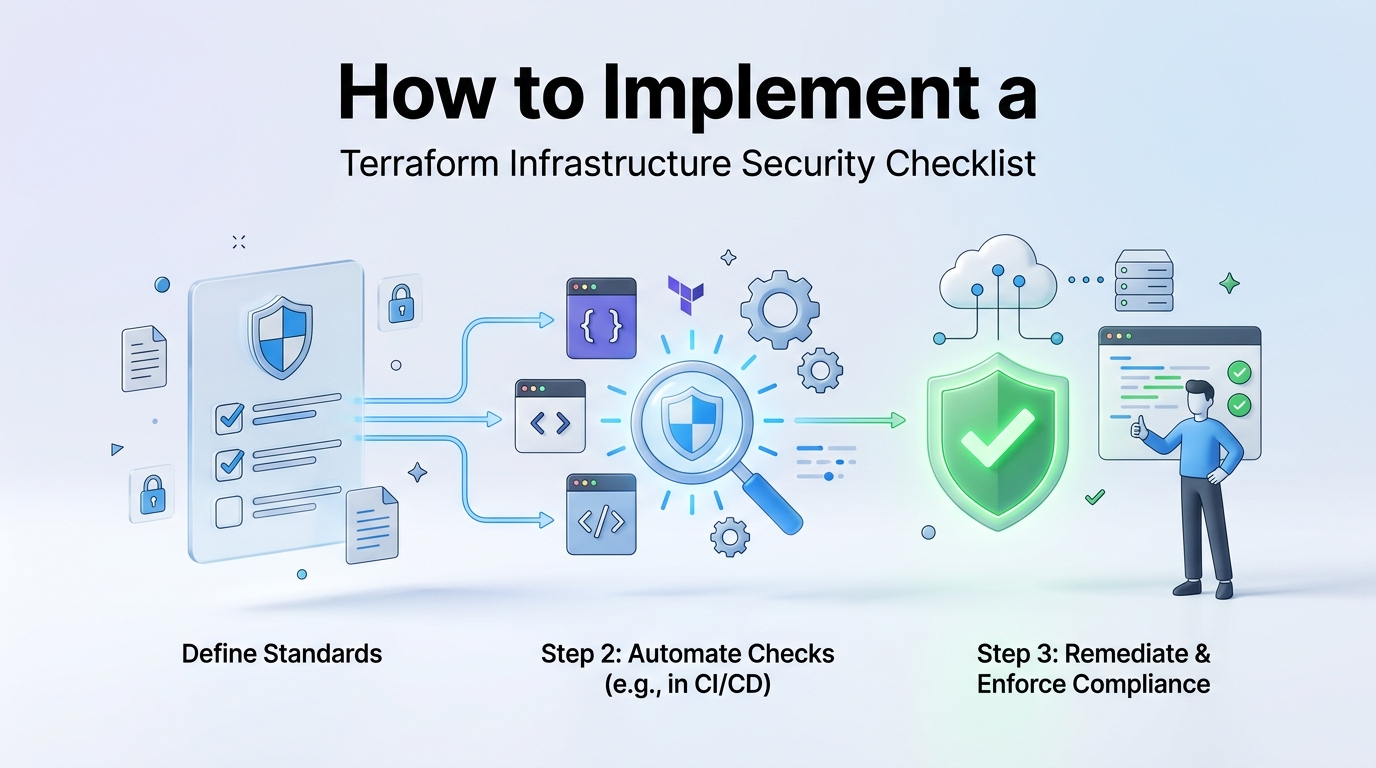
Running terraform apply without verifying your code is like taking off in an airplane without a pre-flight checklist. Everything might run smoothly for a while. However, if a single bad line of HCL leaves a server exposed, you won't realize it until an auditor or an attacker finds it first. We've built an operational framework that catches dangerous misconfigurations before they ever reach your cloud environment.
Executing Your Terraform Infrastructure Security Checklist
Before any team member triggers a build, your pipeline needs hard validation gates. These steps block unsafe code from touching live servers and keep your architecture aligned with zero-trust principles.
1. Run Zero-Trust Security Group Audits
Security groups act like digital bouncers for your cloud instances. A common mistake during rapid development is opening port 22 (SSH) or port 3389 (RDP) to 0.0.0.0/0. That invites anyone on the internet to attempt brute-force logins against your servers. Your pre-apply checks must automatically fail any pull request that exposes administrative ports to the public web. Every inbound rule should require explicit, narrow CIDR blocks or point directly to a private bastion host.
2. Enforce Strict Egress Restrictions
Engineers often focus entirely on keeping threats out, completely forgetting about outgoing traffic. If an attacker manages to compromise an application server, unrestricted outbound access lets them download malware tools or exfiltrate your private databases. Configure your network security rules to deny all egress traffic by default. Only grant explicit outbound permissions for essential target ports and internal subnets.
3. Pass Code Through Automated Compliance Scans
Manual code reviews are slow, and human eyes miss subtle bugs. You need static analysis tools integrated directly into your repository workflow. Utilities like Checkov and tfsec inspect code for compliance against CIS Benchmarks, while policy-as-code engines let you write custom governance rules. You can review the official Open Policy Agent Terraform validation guides to learn how to block non-compliant resources right at the pull request stage.
By enforcing this practical terraform infrastructure security checklist across your team, you eliminate guesswork and keep your production environments safe from preventable breaches.
| Validation Gate | Manual Review Risk | Automated Enforcement Action |
|---|---|---|
| Inbound Rules | Engineers might miss wide open 0.0.0.0/0 IP ranges. |
Pipeline instantly fails builds containing public management ports. |
| Egress Rules | Outbound access is usually left wide open for convenience. | Static policies force default-deny rules on all new VPCs. |
| Secrets Scanning | Hardcoded API keys get merged into main branches. | Pre-commit hooks block commits containing plaintext credentials. |
While software policies guard your code, robust network boundaries require reliable underlying hardware and verified configurations. If you want to strengthen your perimeter protection, our authentic InDevXo Networking Security solutions (Networking Security) deliver enterprise-grade defense direct from the official provider. Pairing verified physical controls with automated code reviews guarantees that your actual live network reflects your target security posture.
Field Tip: Never execute production changes directly from a local terminal. Always require pull requests, automated security scans, and peer approvals through your central pipeline engine.
Integrating these automated gates turns your security policies into active code guardrails. It keeps your engineers moving quickly without risking system stability or compliance standard breaches.
Phase 4: Integrating Official InDevXo Networking Security into IaC Architectures
Manual network configuration breaks down fast in modern cloud systems. When engineers manually open firewall ports or build VPN tunnels in the console, human error creeps in. Someone forgets to close a port. A staging firewall rule stays exposed to the public internet forever. Treating your network perimeter as code eliminates these blind spots completely.
We've seen organizations build elaborate IaC pipelines only to pull unverified networking modules from public registries. Doing that is like buying a front door lock from a shady street vendor. You don't know who holds the master key. That's why deploying official Networking Security solutions from InDevXo straight from the source ensures your traffic boundaries stay bulletproof.
Provisioning Verified Perimeters with the Terraform Infrastructure Security Checklist
Every solid terraform infrastructure security checklist requires verifying where your infrastructure code originates. When you provision edge firewalls, private gateways, and client VPNs, you want direct vendor support. Official code modules come pre-configured to match rigorous audit standards out of the box.
Rule of Thumb: Never source your network security definitions from unverified open-source repositories. Always pull code directly from authentic provider registries to prevent supply chain tampering.
Here's how clean, declarative network defense looks when you couple authentic module blocks into your deployment environment:
# Provisioning Authentic InDevXo Perimeter Safeguards
module "indevxo_network_defense" {
  source  = "indevxo/networking-security/aws"
  version = "2.4.0"

  vpc_id              = module.main_vpc.vpc_id
  enable_strict_waf   = true
  allowed_ingress_ips = ["192.168.1.0/24"]

  vpn_appliance_config = {
    enable_zero_trust = true
    mfa_required      = true
  }

  tags = {
    Environment = "Production"
    AuditStatus = "Compliant"
  }
}
This approach gives your network three main advantages:
- Direct Authenticity: You get genuine defense rules created by the core engineering team. No hidden backdoors or deprecated code patterns.
- Automated Audit Readiness: Code-defined perimeters automatically align with your overall terraform infrastructure security checklist requirements during continuous integration runs.
- Instant Defense Updates: When new threat vectors emerge, authorized modules update directly, letting you patch your entire fleet with a simple pipeline trigger.
Market trends show a massive shift toward vendor-backed network automation. Industry guidance from CIS Security Benchmarks emphasizes that automated perimeter policies drastically lower unauthorized data exfiltration. Choosing verified, direct-to-consumer software ensures your perimeter defenses stand strong against evolving cloud exploits.
Phase 5: Enforcing Least Privilege in CI/CD Automation Pipelines
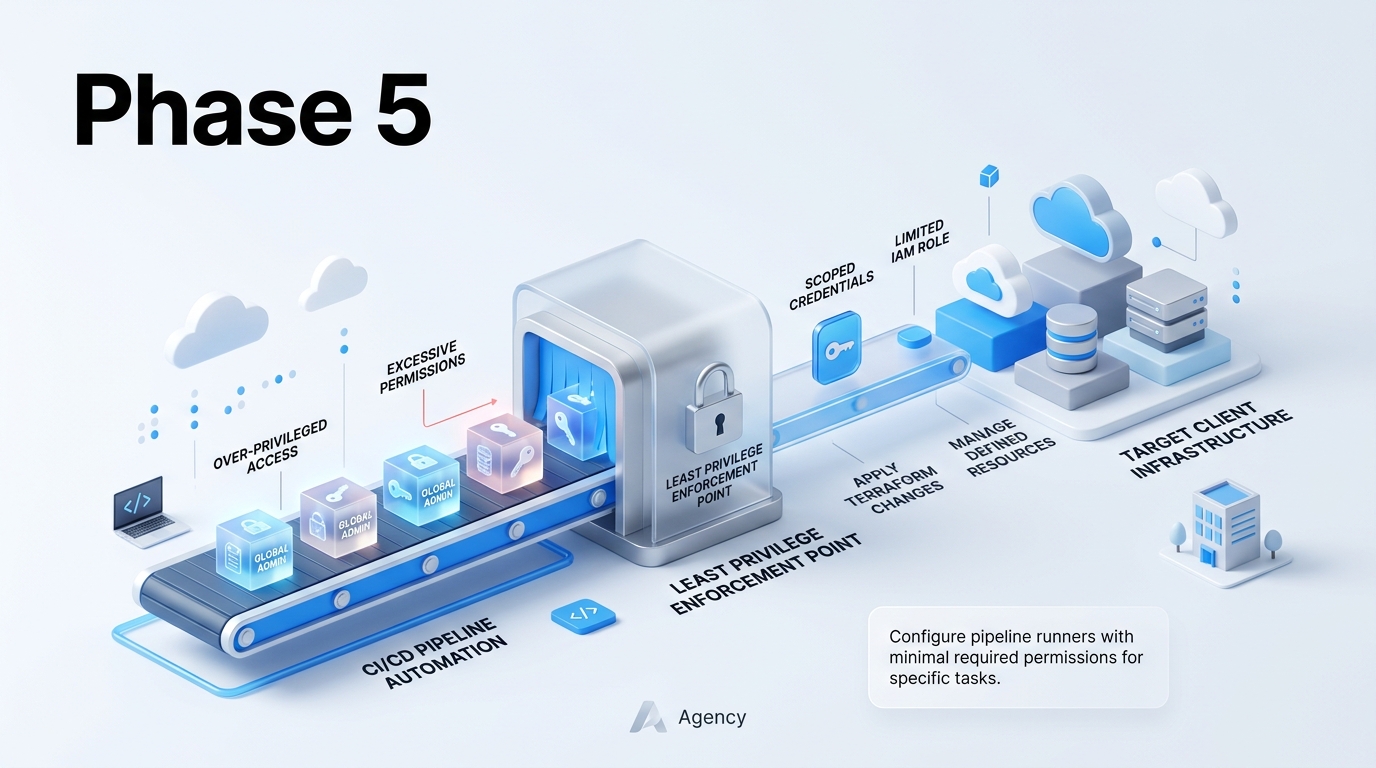
Integrating Pipeline Guards into Your Terraform Infrastructure Security Checklist
Hardcoded cloud credentials in CI/CD secrets are a disaster waiting to happen. If an attacker compromises your runner or pulls secrets from job logs, your entire cloud estate sits exposed. Eliminating permanent access keys forms the core of modern automation defense.
We solve this by moving to OpenID Connect (OIDC). Instead of storing permanent AWS access keys or Azure client secrets inside GitHub Actions or GitLab CI, your build server presents a short-lived digital token to the cloud provider. Think of it like a temporary wristband at a concert venue. The security guard checks your wristband, gives you access for an hour, and then the band expires automatically. Platforms like GitHub Actions, GitLab CI, and Terraform Cloud all support OIDC federated identity natively.
Field Rule: Never store long-lived cloud keys inside repository secrets. If an engineer leaves or a runner gets hijacked, those keys stay dangerous until someone manually rotates them.
| Security Feature | Static Secret Keys | OIDC Federated Tokens |
|---|---|---|
| Credential Lifetime | Permanent (until manually revoked) | Short-lived (15 to 60 minutes) |
| Secret Storage Risk | High (stored in platform settings) | Zero (no persistent secrets saved) |
| Access Scope | Broad account permissions | Scoped strictly to specific repos or branches |
Isolating your plan and apply execution stages prevents rogue code from modifying live systems. Pull requests shouldn't run apply commands directly. Public or internal merge requests should only trigger execution of a plan step. This plan step uses a strictly read-only role to calculate state changes without permission to alter actual infrastructure. Once engineers review and approve the code changes, merging into the production branch triggers the actual apply step using a privileged execution role.
When provisioning perimeter defenses like firewalls and encrypted transit hubs during pipeline runs, relying on verified code blocks prevents human misconfigurations. Implementing certified solutions from our authentic InDevXo Networking Security modules guarantees direct access to pre-tested network templates built specifically to meet tight pipeline standards.
Infrastructure drift happens when team members manually tweak cloud settings outside of your code repository. A forgotten security group rule added during an outage can stay open forever if left unmonitored. Automated drift detection runs regular background scans to spot these silent changes before hackers do.

You can set up automated drift scans using scheduled pipeline runners in GitHub Actions or specialized tools like Spacelift and Atlantis. Configure a daily cron job that runs execution scans against your live cloud accounts. An exit code of 0 means no changes, while an exit code of 2 signals unexpected drift. Your pipeline can immediately send an alert to your security operations team, completing an essential milestone in your overall terraform infrastructure security checklist.
Sustaining Zero-Trust Infrastructure Through Continuous Security
Sustaining Continuous Defense Across Cloud Deployments
Cloud environments shift fast. Bad actors move faster. Treating your cloud setup as a one-time project leaves massive blind spots. True protection requires continuous vigilance across every pull request, backend state storage bucket, and deployment runner.
Executing a complete terraform infrastructure security checklist gives your engineering team a repeatable framework for catching mistakes before code hits production. Isolated misconfigurations—like exposed state files, hardcoded secrets, or over-permissioned service accounts—can quickly turn into company-wide breaches. We've learned that static analysis and policy-as-code serve as your first line of defense. They catch dangerous drift early. Software rules alone cannot block raw network-level attacks if your network boundary remains unmonitored.
Security isn't a static destination; it's a routine workflow. Regular audit cycles keep your HCL code, state locks, and access controls aligned with evolving zero-trust principles.
Disciplined code hygiene works best when paired with authoritative hardware and network guardrails. Integrating authentic InDevXo Networking Security components directly into your IaC blueprints provides direct-from-provider reliability that software templates can't match on their own. This hybrid approach pairs strict code policies with genuine enterprise network controls. It locks down your repository and your live traffic routes simultaneously.
Never treat your terraform infrastructure security checklist as a static document sitting in a forgotten folder. Run automated scanners on every commit. Rotate API tokens regularly. Audit your state access logs every month. When you combine rigorous operational routines with enterprise-grade security tools, your cloud estate shifts from a vulnerable target to an immutable defense posture.