

Cloud Migration Strategy Guide for Enterprise SaaS - enterprise cloud migration strategy guide
Moving legacy systems to modern infrastructure feels like engine replacement while flying mid-air. If you are building a roadmap for your organization, this comprehensive enterprise cloud migration strategy guide gives you the exact blueprint needed to transition your Enterprise SaaS platform cleanly. Legacy servers slow down growth. They trap your data in silos, drain operating budgets, and increase downtime risks during peak demand cycles. Moving off old hardware isn't just a technical IT task; it's a strategic business move that protects your revenue.
Table of Contents
- Navigating the Shift: Why Modern Enterprises Need a Seamless Cloud Transition
- What Is an Enterprise Cloud Migration Strategy Guide and Why Is It Critical?
- How Do You Assess Legacy Infrastructure Before Moving to the Cloud?
- Choosing the Right Execution Model: Rehosting, Refactoring, or Replatforming?
- Why Direct Cloud Deployment with InDevXo Guarantees Enterprise Security and Authenticity
- How to Build a Risk-Mitigated Cloud Cutover and Rollback Plan
- How Can Enterprises Optimize Post-Migration Cloud Performance and Costs?
- Securing Your Digital Future with an Authoritative Cloud Strategy
Unplanned downtime costs major enterprise firms thousands of dollars per minute. Without a clear plan, moving complex software ecosystems creates unexpected security gaps and massive budget overruns. Many teams try using tools like AWS Application Discovery Service or Azure Migrate to map out their existing servers. While these platforms collect valuable system metrics, technology alone won't prevent execution traps. A failed cutover ruins customer trust instantly. You need a disciplined framework to align your developers, security teams, and executive stakeholders around common goals.
That is where expert guidance changes the game. At InDevXo, we remove the guesswork from infrastructure modernizations with our official Cloud Deployment solutions. We work directly with your leadership team as an authentic implementation partner. We ensure your architecture scales securely without unexpected expenses or standard cloud vendor lock-in. Let's break down how to manage your transition smoothly from day one.
What Is an Enterprise Cloud Migration Strategy Guide and Why Is It Critical?

Moving big company computer systems to the cloud is like moving a packed skyscraper across town while everyone keeps working inside. You can't just turn off the lights. An enterprise cloud migration strategy guide acts as your architectural blueprint for this exact challenge. It lays out every step, risk, and resource needed so your shift happens without breaking your business. Without a structured plan, engineering teams end up guessing. Guessing leads to broken databases, angry customers, and massive unexpected cloud bills.
Deconstructing the Enterprise Cloud Migration Strategy Guide
Every successful cloud framework breaks down into five core operational components:
- Business alignment: Linking tech goals directly to revenue and customer experience metrics.
- Portfolio discovery: Cataloging every server, database, and background script in your building.
- Security blueprints: Setting up digital security guards, encryption key rings, and access rules before data moves.
- Landing zone creation: Preparing a pristine, pre-configured environment inside the cloud.
- Cutover orchestration: Running dry-run rehearsals so the actual switch happens smoothly over a weekend.
"A bad migration strategy moves legacy problems to expensive cloud infrastructure. A good strategy fixes the architecture before the first megabyte moves."
Industry tools like the AWS Application Discovery Service help enterprise teams scan existing data centers to find hidden connections between software programs. But automated tools only show you what exists today. They don't build the actual bridge to tomorrow.
That's where direct, pre-configured execution comes in. Rather than spending months wrestling with custom setup scripts, modern tech teams rely on our official InDevXo Cloud Deployment service to set up secure, production-ready cloud environments straight out of the box. It gives enterprise SaaS teams a verified foundation, ensuring your setup meets top security standards right from day one.
Why Strategic Execution Protects Enterprise Workloads
Unplanned downtime burns through cash fast. If a major software platform goes dark for two hours during peak work hours, customer trust vanishes. A proper blueprint prevents this by setting up parallel environments. You keep your old server running while setting up your new cloud space. You slowly redirect small trickles of user traffic to test stability. If something breaks, you instantly flip the switch back. Your users never notice a single glitch.
Data integrity is just as important. Scrambling records mid-move creates nightmarish recovery efforts. Think of data migration like moving millions of delicate glass jars. You count every jar before it leaves the old warehouse and verify its weight the second it lands in the new building. We use continuous database replication engines to keep data synchronized down to the millisecond.
Legacy systems built ten years ago often act like giant, rigid cement blocks. They can't grow when traffic spikes. Modern cloud architecture breaks those blocks down into light, flexible Lego pieces. When big sales surges hit, your software automatically adds more server power in seconds. It then shrinks back down when traffic slows, saving your organization from wasting cash on idle machinery.
How Do You Assess Legacy Infrastructure Before Moving to the Cloud?
Auditing Workloads using an Enterprise Cloud Migration Strategy Guide
Legacy servers hide deep secrets. Over decades of operation, enterprise software collects custom patches, forgotten integrations, and background scripts. Moving these systems without a complete inventory causes unexpected downtime and ballooning cloud costs. A battle-tested enterprise cloud migration strategy guide starts with a complete audit of your current hardware and software assets.
Think of this audit like inspecting an old building before a major renovation. You wouldn't knock down a wall without checking the blueprints. Similarly, your IT team must catalog every database, virtual machine, and web service running in your data center. You need to know what operating system each app runs on, how much memory it consumes, and when it experiences usage spikes.

Essential Baseline Discovery Metrics: Record peak CPU usage, 90-day memory consumption trends, disk read/write IOPS, and active network connections for every candidate application.
Mapping Dependencies and Measuring Technical Debt
Unraveling legacy software code feels like untangling decades of fishing line. One minor service might quietly pull data from an old server hidden under someone's desk. If you move the main app to the cloud while leaving that old server behind, your system crashes instantly. Latency spikes destroy performance. You must build a complete map of how your systems talk to each other before migrating any data.
Technical debt makes this discovery phase challenging. Outdated operating systems, unpatched security software, and hardcoded IP addresses create friction during migration. Software built fifteen years ago often lacks simple APIs. You must decide whether to patch these applications or replace them entirely. Automated discovery tools simplify this mapping process by monitoring network traffic between servers in real time.
| Discovery Tool | Primary Use Case | Key Advantage |
|---|---|---|
| AWS Application Discovery Service | Agentless server tracking | Direct export into native AWS cloud planning tools |
| Dynatrace | Complex multi-cloud environments | Automated topological mapping with AI-driven root cause analysis |
| Azure Migrate | Windows Server & Hyper-V workloads | Built-in cost estimation and readiness scoring |
Sizing Network Pipes and Meeting Compliance Rules
Data transfer takes time. Moving 500 terabytes over a standard business Internet line can take several weeks of continuous uploading. You must calculate your available network throughput before setting cutover deadlines. If your pipe gets clogged during initial database synchronization, daily operations will slow to a crawl. Many enterprises install dedicated private network links to speed up migration traffic.
Regulatory compliance adds legal hurdles to your technical audit. Federal rules like GDPR, HIPAA, and PCI-DSS dictate how customer records move across network boundaries. You must know exact physical locations of your data stored on-premises and confirm that your target cloud provider complies with those same regional laws. Reviewing published NIST cloud computing standards helps risk management teams structure compliant data transfers.
Don't leave target environments to guesswork. Deploying your initial setup using official InDevXo Cloud Deployment offers an authentic, direct-from-provider baseline configured directly for high-volume enterprise ingestion. This provides a clean foundation that prevents security misconfigurations from day one.
Choosing the Right Execution Model: Rehosting, Refactoring, or Replatforming?
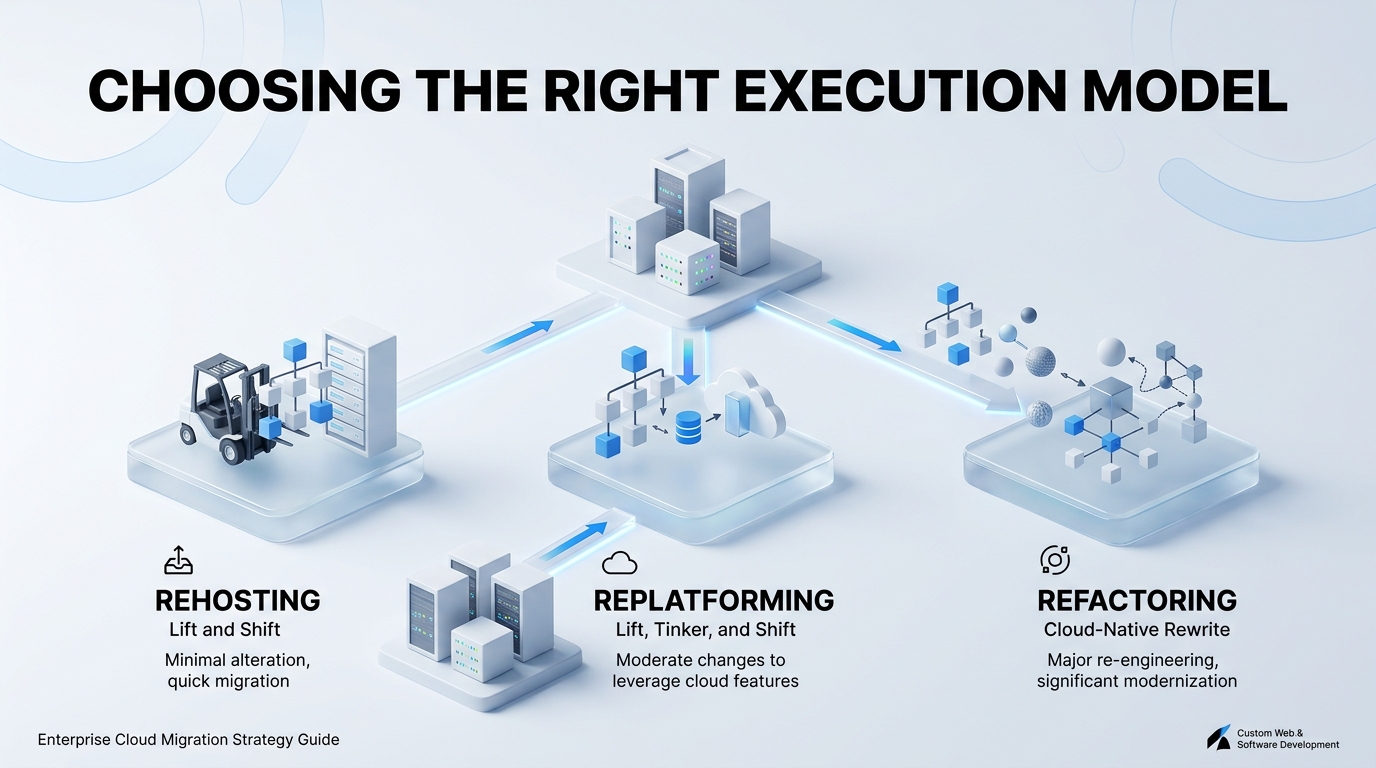
Every server in your data center holds a history lesson. Some applications run smooth, while others barely hold together with outdated scripts. Moving everything to the cloud using a single copy-paste approach will break your budget and break your applications. You need a clear playbook to sort your assets into the right operational buckets.
Cloud architects broadly group these migration paths into six distinct execution models, commonly known as the "6 Rs." Choosing among them requires balancing short-term business pressure against long-term operational efficiency.
| Execution Model | Core Definition | Time to Value | Migration Risk | Cloud-Native Benefits |
|---|---|---|---|---|
| Rehost (Lift & Shift) | Move applications to infrastructure-as-a-service without changing code. | Fastest | Low | Minimal |
| Replatform (Lift & Reshape) | Make targeted updates like switching to managed databases without rewriting core code. | Moderate | Low to Medium | Moderate |
| Refactor (Re-architect) | Rewrite applications natively for cloud microservices and serverless models. | Slowest | High | Maximum |
| Repurchase (Drop & Replace) | Replace legacy software entirely with commercial cloud SaaS solutions. | Fast | Medium (Data & Ops shift) | High |
| Retain (Revisit) | Keep applications on-premises due to compliance, cost, or technical blockers. | Immediate | None | None |
| Retire (Decommission) | Turn off obsolete applications and archive unnecessary data. | Immediate Savings | Low | N/A |
Matching Migration Patterns in Your Enterprise Cloud Migration Strategy Guide
Rehosting works best when you face strict timelines. Imagine packing your entire house into shipping containers and dropping them in a new city. You don't unpack or renovate until you arrive. If your leased data center contract expires in six months, lift-and-shift gets you out the door fast. It buys time, but it doesn't instantly cut operating expenses. Running monolithic virtual machines in public cloud instances can actually increase monthly bills if you don't scale them down properly later.
Replatforming strikes a middle ground. Think of it like moving into a new home and replacing old oil heaters with modern electric heat pumps before unpacking. Your core software stays intact, but you swap out underlying dependencies. You might move self-hosted database servers to managed cloud database services. This reduces daily management work without forcing developer teams to rewrite thousands of lines of legacy code.
Refactoring yields the highest long-term returns, but it costs the most upfront. It's like tearing down an old house to build an energy-efficient modern structure on the foundation. Developers break down monolithic apps into microservices using containers and serverless functions. Applications scale automatically on demand, cutting idle compute costs to near zero. If an application drives core competitive advantages for your enterprise, refactoring gives you flexibility that off-the-shelf software can't touch.
"Speed matters, but direction matters more. Rapidly rehosting broken application logic simply moves your technical debt to an expensive cloud bill."
How do engineering leaders pick the winning model for each workload? They start with three foundational questions:
1. How urgent is your business timeline?
If senior leadership demands immediate data center shutdowns, rehosting is your primary path. You can always optimize infrastructure later once workloads run stably off-site.
2. How flexible is your engineering budget?
Refactoring demands heavy engineering resources and dedicated focus. If budget constraints prevent full application rewrites, replatforming offers quick wins by shifting database management to native cloud services.
3. Does the software give you a market edge?
Off-the-shelf HR or accounting systems rarely need expensive custom rewrites. Repurchasing SaaS alternatives frees internal engineering talent to focus on proprietary systems that generate actual revenue.
Executing these models cleanly requires proven automation frameworks. Cutover delays happen when teams manually configure environments across cloud providers. Using streamlined, automated pipelines guarantees operational security. With official InDevXo direct Cloud Deployment services, enterprise teams get verified deployment pipelines that move workloads safely, preventing misconfigurations during complex technical migrations.
Before moving any code, tag every workload with its assigned model inside your master enterprise cloud migration strategy guide. Audit your application inventory quarterly. You'll likely find that around 10 to 15 percent of legacy enterprise software can be safely turned off immediately, unlocking instant budget relief for high-priority cloud projects.
Why Direct Cloud Deployment with InDevXo Guarantees Enterprise Security and Authenticity
Moving your core business systems to the cloud feels scary. You can't afford security gaps. Many companies rely on third-party brokers or unverified marketplace scripts to rush their setup. That opens up dangerous backdoors. Supply chain attacks on cloud infrastructure increased by over 600% in recent years, making unverified deployment pathways a massive liability (CISA Software Supply Chain Security Guidance). When you cut out the middlemen, you lock down your digital perimeter instantly.
Executing Your Enterprise Cloud Migration Strategy Guide with Direct Infrastructure
Think of cloud provisioning like building a high-security bank vault. Buying pre-packaged configurations from unauthorized resellers is like hiring a locksmith off the street who keeps a master key copy. You want direct, factory-sealed setups. Direct deployment ensures every server instance, virtual network, and database cluster comes straight from the verified source without tampered configuration scripts.

Let me break down how direct setup compares to indirect middleman routes:
| Evaluation Factor | Third-Party Brokers & Resellers | Official InDevXo Cloud Deployment |
|---|---|---|
| Identity & Access Control | Shared tenant accounts, prone to privilege leaks | Direct root boundary controls and zero-trust access |
| Configuration Integrity | Unverified community templates with hidden risks | Guaranteed authentic builds with cryptographic checks |
| Support Channel | Tiered middleman helpdesks with long delays | Native enterprise support directly from provider engineers |
We've built our service to fix this security headache. By choosing our official InDevXo Cloud Deployment software solution, your organization avoids compliance traps created by reseller layers. Every deployment pipeline gets checked against strict regulatory standards before going live on your servers.
Field Note: Direct deployment eliminates the hidden "shadow admin" accounts that third-party setup scripts often leave behind. Your team keeps 100% sovereign ownership over encryption keys and infrastructure policies from day one.
Standard automation platforms like Terraform or AWS Control Tower work well for routine tasks. But they still need verified architecture patterns to stay safe. Any actionable enterprise cloud migration strategy guide must prioritize direct channel provisioning above all else. With verified infrastructure workflows, your SaaS applications run on clean, high-performance environments backed by engineers who answer your calls immediately when you need help.
How to Build a Risk-Mitigated Cloud Cutover and Rollback Plan

Switching off legacy servers is terrifying. It's like swapping an airplane engine while cruising at thirty thousand feet. You can't just flip a switch and pray nothing breaks. A well-planned cutover moves your enterprise data, user traffic, and workloads to the cloud with zero downtime. To get this right, you need a battle-tested roadmap. Our authentic Cloud Deployment solutions at InDevXo streamline this transition so your business stays live every second of the shift.
Before pushing live bits, build a mirror of your production setup. This staging area acts as a safe testing ground. It mimics your exact database schemas, load balancers, and network rules.
How do you verify data integrity before final cutover?
You run continuous integration (CI) tests that simulate real-world traffic loads. These automated scripts flood your cloud network with real business queries. They verify that target databases report identical record counts and that API endpoints respond within milliseconds. If a single query fails or slows down, engineers fix it before real users hit the system.
Field Tip: If your staging environment isn't an exact replica of production schema and capacity, your cutover test results mean nothing. Always match cloud network policies, encryption keys, and instance specs during dry runs.
Syncing data while users write new records demands live replication tools. Industry platforms like AWS Database Migration Service operational tools capture changes in real time. They maintain a continuous Change Data Capture (CDC) pipeline between your on-premises database and the target cloud repository. This stream tracks every new purchase, user sign-up, or profile edit, updating the cloud database in real time.
| Cutover Strategy | Data Sync Method | Business Impact | Best Use Case |
|---|---|---|---|
| Blue/Green Deployment | Continuous Change Data Capture (CDC) | Zero downtime, instant traffic flip | Mission-critical enterprise applications |
| Canary Cutover | Gradual traffic routing via DNS | Low risk, real-user validation | High-volume SaaS platforms |
| Maintenance Window | Bulk database snapshot transfer | Scheduled downtime (1-4 hours) | Non-critical internal legacy tools |

Executing Rollbacks in Your Enterprise Cloud Migration Strategy Guide
Rollback planning isn't an afterthought. It's your primary safety net. If a silent bug escapes staging and degrades live operations, you must fall back quickly. An effective enterprise cloud migration strategy guide mandates setting hard metrics for triggering rollbacks. Set clear triggers: latency spikes over twenty percent or database write errors exceeding zero point zero one percent.
When issues pop up, DNS routing changes should instantly direct user traffic back to your legacy host. Keep target database CDC running in reverse for at least forty-eight hours post-migration. That way, any new transactions created in the cloud feed back into legacy systems without data loss.
Managing these fail-safe mechanisms can feel overwhelming for busy IT teams. That's why choosing direct enterprise deployment infrastructure management options through InDevXo ensures clean execution with built-in rollback security. We offer official Cloud Deployment directly from our store, backed by expert engineers who verify every step of your cutover sequence.
Here is an example of an automated pre-cutover validation script used to verify system readiness before switching live DNS targets:
# Automated Cutover Health Check Protocol
check_target_health() {
  echo "Evaluating target cloud infrastructure health..."
  HEALTH_STATUS=$(curl -s -o /dev/null -w "%{http_code}" https://cloud-staging.internal.net/health)

  if [ "$HEALTH_STATUS" -eq 200 ]; then
    echo "Cloud target healthy. Initiating DNS traffic migration."
    python3 sync_dns_records.py --target green --failover-rollback ready
  else
    echo "Target health check failed with status $HEALTH_STATUS. Aborting cutover!"
    python3 trigger_alert.py --severity CRITICAL --action abort
    exit 1
  fi
}
check_target_health
Following this structured sequence protects your revenue and reputation. You avoid sudden outages, keep data intact, and give your executive team total confidence during cutover day.
How Can Enterprises Optimize Post-Migration Cloud Performance and Costs?
The cutover is complete. Your SaaS workloads live in the cloud. Now comes the hard part: keeping them fast without blowing through your operational budget.
Moving workloads to public cloud providers changes how you pay for compute power. On-premises hardware costs were fixed upfront capital expenses. Cloud infrastructure operates like a running water faucet. Leave it running unattended overnight, and your monthly invoice will shock your finance team. Managing Day-2 operations demands a proactive approach to resource usage, system responsiveness, and spending controls.

The shift from initial migration to long-term management requires clear operational contrast across your engineering teams:
| Operational Focus | Legacy Reactive Management | Modern Optimized Governance |
|---|---|---|
| Cost Control | Reviewing static end-of-month cloud invoices. | Real-time anomaly alerts and automated rightsizing routines. |
| Capacity Planning | Over-provisioning servers to handle peak annual traffic. | Dynamic horizontal auto-scaling triggered by live user metrics. |
| Resource Visibility | Untagged instances with unknown project owners. | Strict mandatory tagging metadata policies enforced at launch. |
Applying FinOps in Your Enterprise Cloud Migration Strategy Guide
To keep costs from spiraling out of control, top engineering teams turn to financial operations practices. FinOps isn't just about cutting budgets. It's about getting the highest business value out of every single cloud dollar spent.
Every comprehensive FinOps framework guidelines document emphasizes breaking down departmental silos. Developers must see the financial impact of their code, while finance managers need visibility into cluster resource demands. Start by enforcing strict metadata tagging on all deployed assets. If an instance lacks an owner, application name, or environment tag, automated scripts should quarantine or shut down that instance within twenty-four hours.
When you rely on InDevXo for direct, official authentic Cloud Deployment solutions, your environment starts on solid footing. We build cost guardrails and structural tagging directly into your baseline templates, ensuring you never pay for unassigned zombie workloads from day one.
Real-Time Performance Tuning and Dynamic Workload Scaling
Speed keeps users happy. High latency causes churn.
Monitoring cloud applications requires looking deeper than simple CPU utilization charts. You need full visibility into database query speeds, memory usage spikes, and network packet delays across every distributed microservice. Industry standard monitoring platforms like Datadog continuous application performance monitoring give engineering teams instant alerts when transaction execution times degrade.
Rule of Thumb: Right-size your compute resources before setting up auto-scaling rules. Scaling out an inefficient, bloated application simply multiplies your cloud spending without fixing the underlying bottleneck.
Automated scaling policies must align with your true application behavior. Set your horizontal pod autoscalers or virtual machine scale sets to monitor memory footprints and HTTP request queues rather than raw processor cycles. This prevents premature scaling events while protecting user experience during sudden traffic surges.
Cloud governance acts as your digital guardrail system. It prevents unauthorized developers from spinning up high-end graphics processing units for simple staging tests. Combine cloud provider tools like AWS Cost Explorer analytics tools with strict identity and access management policies. Limit provisioning permissions to approved continuous integration pipelines.
Review your instance usage monthly. Swap out on-demand compute instances for three-year committed use discounts or savings plans once your baseline traffic stabilizes. Doing so regularly slashes your operational expenditure by up to sixty percent while maintaining peak SaaS application performance.
Securing Your Digital Future with an Authoritative Cloud Strategy
Mastering Your Enterprise Cloud Migration Strategy Guide for Long-Term Growth
Legacy software keeps your business anchored to the past. Modernizing your stack isn't just a technical upgrade; it's a core survival tactic. Following a clear enterprise cloud migration strategy guide helps executive teams bypass operational friction while unlocking massive scalable growth. Current enterprise data shows that SaaS platforms moving toward cloud-native automation achieve far higher agility than those sticking with outdated hybrid setups.
Executing this shift requires the right platform tools. Platforms like AWS Migration Hub or Azure Migrate offer standard automated discovery tools. However, complex enterprise SaaS environments demand customized precision rather than one-size-fits-all scripts. You need a setup that guarantees zero security loopholes and immediate regulatory alignment without ballooning your monthly budget.
A successful cloud transition isn't measured by how fast you move your data. It's defined by how securely and reliably your applications run once they arrive.
That's why relying on an authentic execution solution makes all the difference. When you partner with InDevXo for direct Cloud Deployment, you eliminate third-party security risks and costly configuration errors. We deliver direct access to official cloud infrastructure engineering solutions built specifically for high-throughput SaaS applications. You get maximum system performance, guaranteed regulatory safety, and continuous operational support straight from the official provider.
Don't leave your infrastructure to chance. The digital landscape changes every day. We've seen firsthand how misplaced configurations ruin multi-million dollar migration projects. By putting this enterprise cloud migration strategy guide into action and leveraging our official Cloud Deployment services, your organization secures a permanent competitive edge.